

New fence page for Vector customers in Horizon!

As information can change over time, If you read this outside of 6 months from the original post date, please confirm with your WCR advisor that the information is still valid and accurate.
Introducing the New Fence Page in Horizon
We have redesigned the fence page in Horizon to reduce user errors related to location and fence settings. Previously, when fences had different settings from their locations (indicated in purple), changes at the location level did not affect the fence settings. This caused confusion and errors among users, making it difficult for farmers to understand and for field support to explain. The new design clarifies these differences and improves usability and design for a better customer experience. The updated fence page is available in both the Horizon app and the desktop version.
So, What's New?
Focus on Fences: The new page focuses on fences rather than locations. Fence-related settings can no longer be adjusted at the location level. Location settings are now limited to:
Ration changes - on the overview page
Location types - on location settings page
Reporting settings - on location settings page

Quick Batch Entries: The new fence page emphasizes batch entries, allowing users to make quick changes to multiple fences simultaneously. By selecting the desired fences via checkboxes, users can easily adjust dosing weights, feed heights, and temporary settings like feed pauses and temporary feed heights.
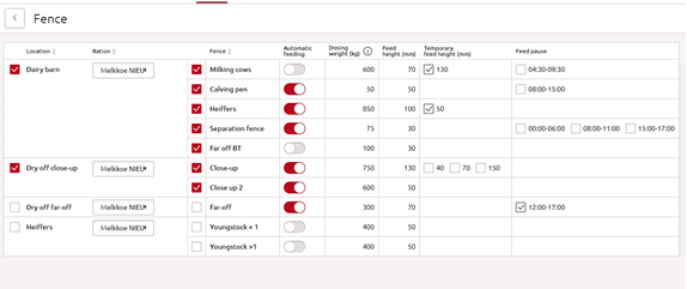
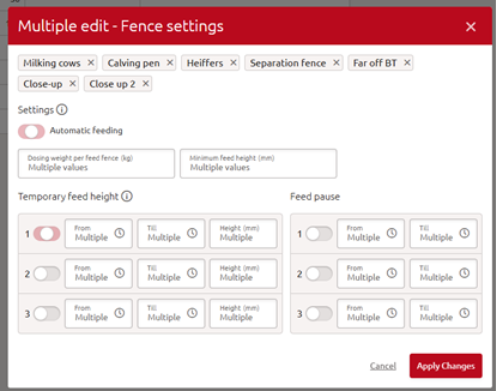
Dosing Weight on Overview Page: Users can now change dosing weights directly from the main page, just like feed heights.

Dosing weight automatically limited by maximum load of ration; The MFR has a recommended load of 600 kg, but this can vary depending on the ration. For example, rations with fluffy materials may require a lower load. To ensure safe dosing, the dosing weight is limited by the maximum load set on the mixed ration page. To give the user more insights on the ration maximum load, the amount is shown via a hover over and on the fence settings. If dosing weight exceeds the maximum load as set on the mixed ration page, the Vector will automatically feed the maximum load. This change eliminates the need for a toggle switch, reducing confusion.

Ration steps for Beef customers: The new fence page offers automatic ration changes based on the animals' age for beef customers. The settings will be visible after activating the toggle of ‘Add ration steps’.

Stay Up to Date
Don't forget to regularly check the What's New section in Horizon to stay informed on the latest features, improvements, and updates. It's the easiest way to make sure you're getting the most out of your system and taking advantage of new tools as they become available.


Comments